2 Player Games - Offline
- 4.7
- Rating
- 1.00M
- Installs
- Free
- Price
 Analysis by App-foxy
I like board games most when they remove the awkward preparation: no box to carry, no pieces to lose, and no long explanation before anyone can play. 2 Player Games - Offline takes that idea and turns it into a collection of quick local challenges for friends or family. It is a free board game from Soup Ent, designed for two to four people sharing a device, and its biggest appeal is simple: you can start a face-to-face match without needing Wi-Fi.
That simplicity makes it especially approachable for a first-time user. I would recommend it for a short break, a family table, a trip where an internet connection is unreliable, or any moment when two people want something competitive without committing to a full-length board game. It is not trying to replace a deep strategy title or a polished online multiplayer platform. Instead, it works best as a convenient collection of small contests that gets people playing quickly.
What to expect when you open the game
The store description calls it “2 Player Games,” but the broader experience supports groups of two to four. That distinction matters. The strongest use case is still a pair of players passing the device or sharing the screen, while the extra player support gives a family or small group more flexibility. I would think of it as a digital tabletop activity rather than a traditional single-player board game.
You May Also Like

 Blood Strike: 2.5 Anniversary
Blood Strike’s Loadouts Turn Every Drop Into a Tactical Gamble
A close look at Blood Strike’s custom loadouts: how fast access to signature weapons reshapes its battle royale rhythm, rewards preparation, and narrows the gap between fights.

 Pandora - Music & Podcasts
Pandora’s Music Is Easy to Start, but Harder to Recover
Pandora’s strength is its low-effort path from a seed to a station. Its weak spot is how much confidence it asks you to place in connection, setup, and quiet recovery.

 8 Ball Pool
 Is Built on Rivalries, Rematches, and Routine
A close look at the rivalries, rematches, shared routines, and unanswered safety questions that turn a quick pool match into a persistent mobile community.

 Samsung Music
’s Quiet Strength Is Playing What You Already Own
Its reach comes less from spectacle than from dependable access to a personal library. That simplicity is both the app’s strongest retention engine and its ceiling.

 AccuWeather: Weather Radar
AccuWeather Review: A Quick, Clear Forecast for Everyday Decisions
For everyday plans, the best forecast is the one you can understand quickly. AccuWeather makes rain timing, radar, and local conditions easy to act on, with a few trade-offs.

 Hill Climb Racing
Why Hill Climb Racing Still Turns Crashes Into One More Run
A tiny car, a bumpy hill and one more upgrade: Hill Climb Racing keeps resurfacing because its simple chaos makes every near-miss feel personal.
More From Our News Desk



The offline focus is the first thing to understand. You are not opening it to compete against a worldwide ranking, invite a remote friend, or build a long-term online profile. You are opening it because another person is physically nearby. That makes the game feel more social than many mobile titles, even though the phone or tablet remains at the center of the action.
In practice, this format is useful in places where online games are inconvenient. A family waiting somewhere can share one device. Two friends can play during a short pause without asking whether the network is working. Parents can also use it as a quick activity with children because the interaction happens in the same room, rather than through separate accounts and screens.
The game is listed for Everyone, which fits its accessible presentation and family-oriented purpose. Even so, age suitability is not the same as guaranteed fun for every age. Very young players may need help understanding turns or controls, while older players who want complex planning may find the short-form design too light. My advice is to treat it as an easy entry point, not as a substitute for a serious strategy collection.
Its reception is encouraging: it holds a 4.7 average from around 2.3 thousand ratings and has passed 500 thousand installs. Those figures suggest that the basic idea has found an audience, but they do not remove the need to judge the format for yourself. A high rating is most meaningful here if you want quick local play; it tells you less if your priority is online matchmaking, solo progression, or extensive customization.
One practical expectation is that the quality of a session depends partly on the device you share. A larger screen is more comfortable when several people are watching, while a small phone can make handoffs and button presses feel crowded. Before starting, I would place the device on a stable surface and agree on how players will take turns. That tiny bit of preparation prevents the most common source of friction in local mobile games: people reaching across one another or missing what is happening.
Starting without overthinking the first screen
For a first session, I would avoid trying to understand every available option at once. Choose a two-player match if you are alone with one friend, then let the game introduce its particular challenge through play. The goal is not to memorize a rulebook. It is to recognize who acts first, what counts as a successful move, and how the game signals the end of a round.
If three or four people are present, decide in advance whether everyone wants to play every round or rotate after each result. This is a useful social rule that the app itself cannot settle for you. With four people, rotation can keep waiting time low; with two, a direct rematch usually feels more natural. Making that decision before the first round keeps the focus on the game rather than on negotiating turns.
I also recommend beginning with a short trial round instead of treating the first attempt as a serious contest. The first round is valuable for learning the touch areas, the pace, and the way the screen is shared. Once everyone understands those basics, the second round is usually more enjoyable because players can concentrate on choices rather than interface discovery.
Because the game is free, it is easy to try without making a purchase decision before you know whether the group likes it. There are in-app purchases priced from $1.99 to $4.99 per item, so I would let the free experience establish its value first. If you are handing the device to children, it is sensible for the adult who owns the device to handle purchase controls and avoid turning a casual match into an accidental spending moment.
The current version is 1.4.9, and the listed minimum operating system is Android 7.1. That makes it accessible to many older Android devices, although actual comfort still depends on screen size, responsiveness, and battery condition. I would not judge the game solely by whether it installs. A game built around quick reactions or shared controls is much more pleasant when the device responds promptly.
How to reach the first meaningful win
The first successful action is not necessarily winning the entire session. For a new player, it is completing one round while understanding why the result happened. That is the moment the game stops feeling like an unfamiliar menu and starts feeling like a playable activity. I would focus on that milestone rather than trying to dominate immediately.
When the first round begins, watch the screen before tapping quickly. Identify the active area, notice whether the game gives both players the same information, and pay attention to any visual change that indicates a turn or result. In a shared-device game, players often lose not because the challenge is difficult, but because they react before confirming whose action is expected.
A helpful routine is to say “ready” before each attempt. This sounds unnecessary, but it solves a real problem: one player may be holding the device while the other is still looking away. A shared countdown or visual cue is easier to use when both people are prepared. The routine also makes the contest feel fairer, especially when a child is playing against an adult.
After the first result, resist the temptation to restart instantly without discussing it. Ask what each player thought the objective was and compare that with what actually happened. This short conversation exposes misunderstandings early. It is particularly useful when the game’s challenge is fast or when the device has been passed between players.
For a first-time user, I would use a best-of-three arrangement rather than a single decisive round. One round can be affected by an accidental tap, a missed instruction, or simple unfamiliarity with the controls. Three rounds give both players a chance to adjust and make the outcome feel more satisfying without creating a long commitment.
Another practical tip is to keep the first match between people with similar expectations. If one person wants a relaxed laugh and the other wants intense competition, even a well-designed mini-game can feel disappointing. Agree on the mood first: casual practice, a close contest, or a quick way to settle a friendly argument. The same app can serve all three purposes, but the experience changes depending on the attitude at the table.
Confusion that can spoil an otherwise good session
The main source of confusion is assuming that “offline” means the game is a complete replacement for every kind of multiplayer experience. It is not. Offline play means the people who want to compete need to be together, using the same device. If your friend or relative is in another location, this is the wrong format, and an online multiplayer game will serve that situation better.
Another misunderstanding concerns the phrase “two-player games.” The title naturally suggests a dedicated two-person experience, but the game also accommodates up to four players. That is useful for groups, yet it may require more turn management. With more than two people, agree on an order and keep the device positioned so everyone can see. Otherwise, players at the edge of the group can feel like spectators instead of participants.
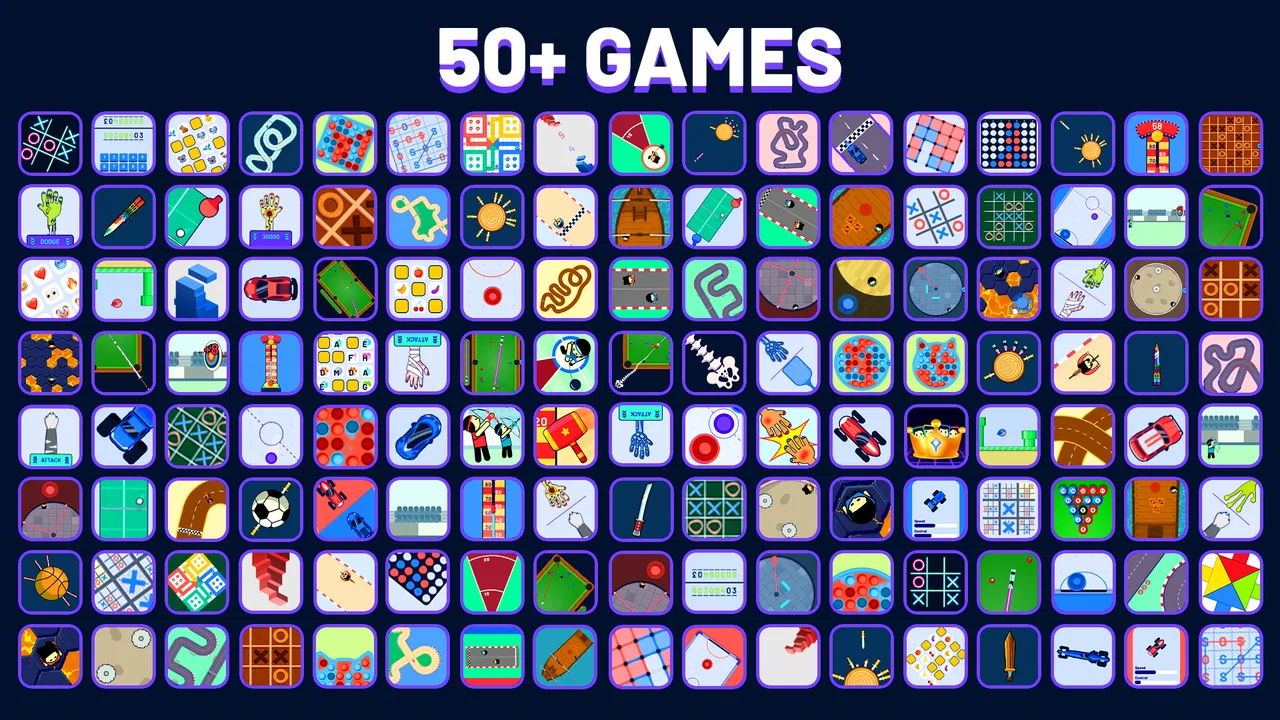
People can also confuse a collection of quick challenges with a campaign. I would not approach this expecting a long narrative, character development, or a carefully built solo journey. Its value comes from replaying short contests with people nearby. If you prefer unlocking a world over repeated local rounds, a conventional adventure or strategy game will probably hold your attention longer.
The purchase model is another point worth handling calmly. The game is free to download, but optional items cost between $1.99 and $4.99 each. That does not automatically make the experience poor, yet it means the free version should be evaluated on its own terms. I would avoid buying anything during the excitement of a close match. Play several sessions, decide whether the available content already works for your group, and only then consider whether an optional purchase genuinely improves your use of the app.
There is also a social limitation that does not appear in technical specifications: sharing one screen can become tiring. Two players may enjoy being close to the action, but four people gathered around a small phone can struggle to see clearly. In that situation, a tablet or a physical board game may be the better choice. The app’s convenience is strongest when the screen matches the size of the group.
Finally, do not assume that every player will enjoy the same pace. A quick challenge can be exciting for someone who likes immediate decisions and frustrating for someone who needs time to understand the objective. If a player is struggling, use the first round as practice and explain the result afterward. That approach keeps the game welcoming instead of turning a simple family activity into an avoidable argument.
Small techniques that make local play better
My first non-obvious tip is to create a clear “device zone.” Put the phone or tablet in the middle of the table, keep drinks and loose objects away from it, and decide that only the currently active player touches the screen unless the game clearly requires simultaneous input. This reduces accidental presses and makes the match easier to follow.
My second tip is to use the app as a conversation starter rather than allowing it to replace conversation. After each round, give the winner a few seconds to explain what they noticed. This turns repeated play into a light learning loop: players begin to recognize timing, patterns, or habits instead of tapping randomly. It also gives less experienced players a way to improve without feeling embarrassed.
A third useful approach is to change the stakes without changing the software. You can play for choosing the next snack, selecting the next song, or simply earning the right to request a rematch. Keep the reward small and friendly. The point is to give a short session a reason to continue, not to make every round feel like a serious tournament.
For families, I would pair the game with a time limit. A ten-minute session before dinner or during a waiting period is easier to manage than an open-ended “one more round.” For friends, the opposite may work better: agree to stop after everyone has won once. These rules make the app fit the moment and prevent its quick rounds from quietly consuming more time than intended.
For four players, rotate the role of organizer. One person can manage the order in the first match, another in the next. This avoids having one player become a permanent referee and keeps everyone involved. It is a small adjustment, but it matters when the game is used repeatedly by the same family or group.
Compared with physical board games, the app wins on setup speed and portability. There are no pieces to sort, no board to unfold, and no concern about losing a token while traveling. Compared with online multiplayer games, it wins on immediacy and face-to-face interaction, but loses the ability to connect people who are far apart. Compared with a traditional two-player strategy game, it is easier to introduce but likely less rewarding for players who want deep planning over many turns.
Who should try it, and who should choose something else
I think this is a strong choice for someone who wants a free way to fill short gaps with another person nearby. It suits families, roommates, couples, classmates, and friends who enjoy friendly competition but do not want to learn a large rule set. The Everyone rating also makes it a reasonable candidate for mixed-age groups, provided an adult helps younger players with the device and purchase decisions.
It is particularly useful when the internet is unavailable or when online play would feel impersonal. A train journey, a waiting room, a holiday gathering, or a quiet evening at home can all benefit from a game that starts with very little preparation. The offline design is not just a technical detail; it changes the social setting by keeping both players present in the same physical space.
I would skip it if your main requirement is a solo game with lasting progression. I would also look elsewhere if you need remote multiplayer, detailed competitive rankings, or a single board game with substantial strategic depth. Someone who dislikes sharing a screen may prefer a physical game, while someone who wants polished online matchmaking will be better served by a dedicated networked title.
Storage and device age may influence the decision too. The game supports Android devices from 7.1 onward, but an older phone can still be uncomfortable if its display is small or its touch response is inconsistent. If you are choosing between a phone and a tablet, use the larger screen for groups and reserve the phone for a pair. That simple choice can make the difference between a smooth session and constant complaints about visibility.
The next session: turning a quick try into a reliable activity
Once you have completed a successful first round, I would create a repeatable routine: choose the number of players, set a short match format, place the device where everyone can see, and agree on whether the mood is casual or competitive. This removes the small decisions that often delay local play. The game then becomes something you can reach for naturally when people are together.
Keep track of who has won only if your group enjoys that kind of friendly history. A simple verbal record is enough; there is no need to turn every session into a formal league. If the same person wins repeatedly, change opponents, rotate the starting player, or switch the challenge rather than blaming the game. Variety in the group often matters more than any individual result.
After a few sessions, decide whether the free experience is sufficient. Since optional purchases range from $1.99 to $4.99 per item, the sensible test is practical: does the group still enjoy returning to it, and would an extra purchase add something you will actually use? If the answer is no, keep playing without spending. The game’s central benefit is the local interaction, not the pressure to buy.
Soup Ent has made a focused board game for people who want immediate, shared entertainment rather than a complicated mobile hobby. The 4.7 average and audience of over 500 thousand installs show that the concept has broad appeal, while the current 1.4.9 release gives new users a clear version to start with. I would describe it as a handy social tool: strongest in short sessions, with nearby players, on a screen everyone can comfortably share.
My recommendation is simple: install it when you want a quick offline contest with people in the same room. Start with a practice round, keep the device central, and judge it by how naturally it brings the group into the same activity. It is not the right answer for every board-game fan, but for a first-time user looking for an easy path from installation to a meaningful win, it offers a reassuringly low barrier and a useful reason to put the phone down between rounds and talk.
FAQs for 2 Player Games - Offline
01What is 2 Player Games - Offline and how does it work?
2 Player Games - Offline is a mobile application designed to offer a variety of multiplayer games that can be played on a single device without an internet connection. It includes a collection of simple, fun games suitable for friends or family to enjoy together, making it perfect for passing time in offline settings.
02Do I need an internet connection to play 2 Player Games - Offline?
No, you do not need an internet connection to play 2 Player Games - Offline. The app is specifically designed for offline play, allowing two players to engage in games on the same device. This makes it ideal for situations where internet access is unavailable or restricted.
03What types of games are included in 2 Player Games - Offline?
The app features a wide range of games catering to different interests and skill levels. From classic board games and strategy challenges to quick reflex and puzzle games, there's something for everyone. Each game is designed to be easy to pick up and play, ensuring fun for all ages.
04Are there any in-app purchases or ads in 2 Player Games - Offline?
While 2 Player Games - Offline is free to download, it may contain ads that appear between games. Some versions might offer in-app purchases to remove ads or unlock additional content. It's advisable to check the app store listing for specific details on any monetization features.
05Is 2 Player Games - Offline suitable for children?
Yes, 2 Player Games - Offline is generally suitable for children. The games are designed to be simple and family-friendly, promoting fun and interaction in a safe environment. However, it's always recommended for parents to review the games first to ensure they are appropriate for their children’s age and maturity level.
Pros
- Variety of games included for endless fun.
- No internet required for gameplay.
- Easy-to-use interface for all ages.
- Multiplayer enhances social interaction.
- Quick setup and minimal loading times.
Cons
- Limited to two players only.
- Graphics are basic and simplistic.
- Ads can interrupt gameplay frequently.
- Some games lack depth and challenge.
- No single-player mode available.

2 Player Games - Offline
Gallery